Versus Image Creator
Combine Two Images Side-by-Side with a 'VS' Label to Create a Head-to-Head Comparison Image
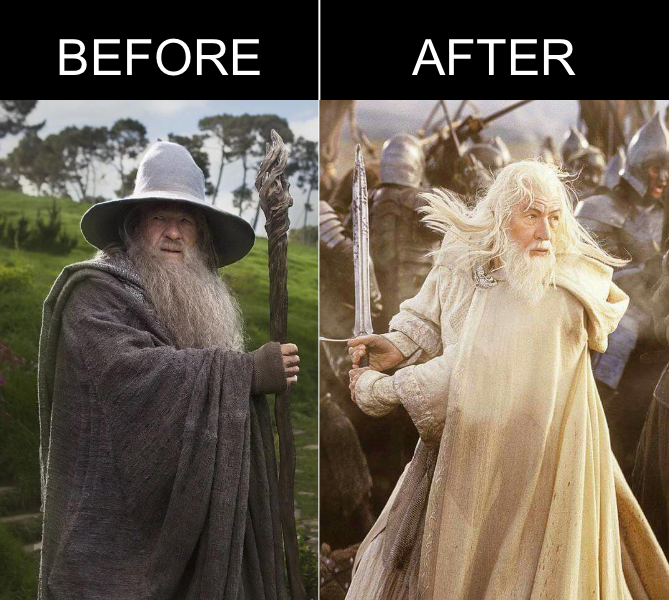
Versus Image Creator is a web-based tool that allows users to combine two images side-by-side with a 'VS' label in the center. This tool is designed for users who want to create head-to-head comparison images for various purposes such as social media posts, marketing materials, presentations, or just for fun. The application operates entirely in the user's browser, ensuring that no data is sent to a server, thus maintaining user privacy. With Versus Image Creator, users can easily upload two images, customize the 'VS' label, and generate a high-quality comparison image that can be downloaded and shared across different platforms. Whether you're comparing products, showcasing before-and-after scenarios, or creating engaging content, Versus Image Creator provides a simple and efficient solution for creating visually appealing comparison images.
Use the Tool
Drag & drop or click to select
Drag & drop or click to select
Get notified about updates to this tool
No spam. Just high-quality updates about new features and guides.
What This Tool Does
What the tool does
Versus Image Creator is a web-based tool that allows users to combine two images side-by-side with a 'VS' label in the center. The tool provides an easy-to-use interface where users can upload two images, customize the 'VS' label, and generate a high-quality comparison image. The application operates entirely in the user's browser, ensuring that no data is sent to a server, thus maintaining user privacy. With Versus Image Creator, users can create visually appealing comparison images for various purposes such as social media posts, marketing materials, presentations, or just for fun. The generated comparison image can be downloaded and shared across different platforms, making it a versatile tool for anyone looking to create engaging content that showcases head-to-head comparisons.
What problems it solves
Versus Image Creator solves the problem of creating visually appealing comparison images without the need for complex image editing software or technical skills. It provides a simple and efficient way for users to combine two images side-by-side with a 'VS' label, allowing them to create engaging content for social media, marketing, presentations, and more. By operating entirely in the user's browser, it eliminates concerns about data privacy and security, as no images or data are sent to a server. This makes it an ideal solution for users who want to quickly create comparison images while maintaining control over their data. Additionally, the tool's user-friendly interface and customizable options make it accessible to a wide range of users, from casual content creators to professionals looking to enhance their visual storytelling.
Who should use it
Versus Image Creator is ideal for a wide range of users, including social media managers, marketers, educators, students, content creators, and anyone who wants to create engaging comparison images for various purposes. It is particularly useful for those who want to showcase head-to-head comparisons of products, services, before-and-after scenarios, or any other visual content that benefits from a side-by-side format. The tool's user-friendly interface and customizable options make it accessible to both beginners and professionals, allowing them to create high-quality comparison images without the need for complex image editing software. Whether you're looking to create engaging social media posts, enhance your marketing materials, or add visual interest to your presentations, Versus Image Creator provides a convenient and efficient solution for creating compelling comparison images.
Why it matters
Versus Image Creator matters because it provides a simple and efficient way for users to create visually appealing comparison images without the need for complex image editing software or technical skills. In today's digital age, visual content is crucial for engaging audiences on social media, marketing campaigns, presentations, and more. By allowing users to easily combine two images side-by-side with a 'VS' label, this tool enables them to create compelling content that can capture attention and convey information effectively. Additionally, since the tool operates entirely in the user's browser, it addresses concerns about data privacy and security, making it a trustworthy option for users who want to maintain control over their data. Overall, Versus Image Creator empowers users to enhance their visual storytelling and create engaging content that resonates with their audience.
How It Works
Input
Users can upload two images that they want to compare side-by-side. The tool provides an interface for users to select and upload their images from their device. Once the images are uploaded, users can customize the 'VS' label that will be displayed in the center of the comparison image. This allows users to create a personalized and visually appealing comparison image that suits their specific needs and preferences. The input process is designed to be user-friendly and straightforward, making it easy for anyone to create engaging comparison images without the need for technical skills or complex software.
Processing
Once the user uploads the two images and customizes the 'VS' label, Versus Image Creator processes the images entirely in the user's browser. The tool uses client-side image processing techniques to combine the two images side-by-side and overlay the 'VS' label in the center. This processing is done locally on the user's device, ensuring that no data is sent to a server, thus maintaining user privacy. The tool generates a high-quality comparison image that can be downloaded and shared across different platforms. The processing is designed to be efficient and fast, allowing users to create their comparison images quickly without any delays or performance issues.
Limitations
While Versus Image Creator is a powerful tool for creating comparison images, it does have some limitations. The tool may not be able to handle extremely large image files or certain image formats, which could affect the quality of the generated comparison image. Additionally, since the processing is done entirely in the user's browser, it may not perform well on older devices or browsers with limited resources. Users should also be aware that the tool is designed for creating simple side-by-side comparisons and may not support advanced editing features or complex layouts. It is important for users to ensure that their images are compatible with the tool and to be mindful of these limitations when creating their comparison images.
Output
The output of Versus Image Creator is a high-quality comparison image that combines the two uploaded images side-by-side with a customizable 'VS' label in the center. The generated comparison image can be downloaded in a standard image format such as PNG or JPEG, allowing users to easily share it across different platforms such as social media, marketing materials, presentations, and more. The output is designed to be visually appealing and engaging, making it an effective tool for showcasing head-to-head comparisons of products, services, before-and-after scenarios, or any other visual content that benefits from a side-by-side format. Users can use the generated comparison image to enhance their visual storytelling and create compelling content that resonates with their audience.
Frequently Asked Questions
Is this tool free?
Yes, Versus Image Creator is 100% free to use. There are no hidden fees or watermarks added to your downloads.
Are my images verified/stored on your server?
No. This tool runs entirely in your browser (client-side). Your images are processed locally on your device and are never uploaded to any server, ensuring complete privacy.
What image formats can I upload?
You can upload standard image formats including JPEG, PNG, and WebP.
Can I customize the "VS" label?
Yes! You can change the color, size, and style of the central "VS" badge to match your preferences or brand colors.
Does it work on mobile?
Yes, the tool is responsive and works well on mobile devices, allowing you to create comparison images on the go.
Can I resize the images?
The tool automatically attempts to fit your images side-by-side. For the best results, we recommend using images with similar aspect ratios, but the tool handles different sizes by centering them within the frame.
Related Tools
Related Posts
Get Early Access to New Tools
Be the first to try new APIs and applications. No noise. Only meaningful releases and practical engineering insights.