Memory Crystal: Clipboard and Copy History
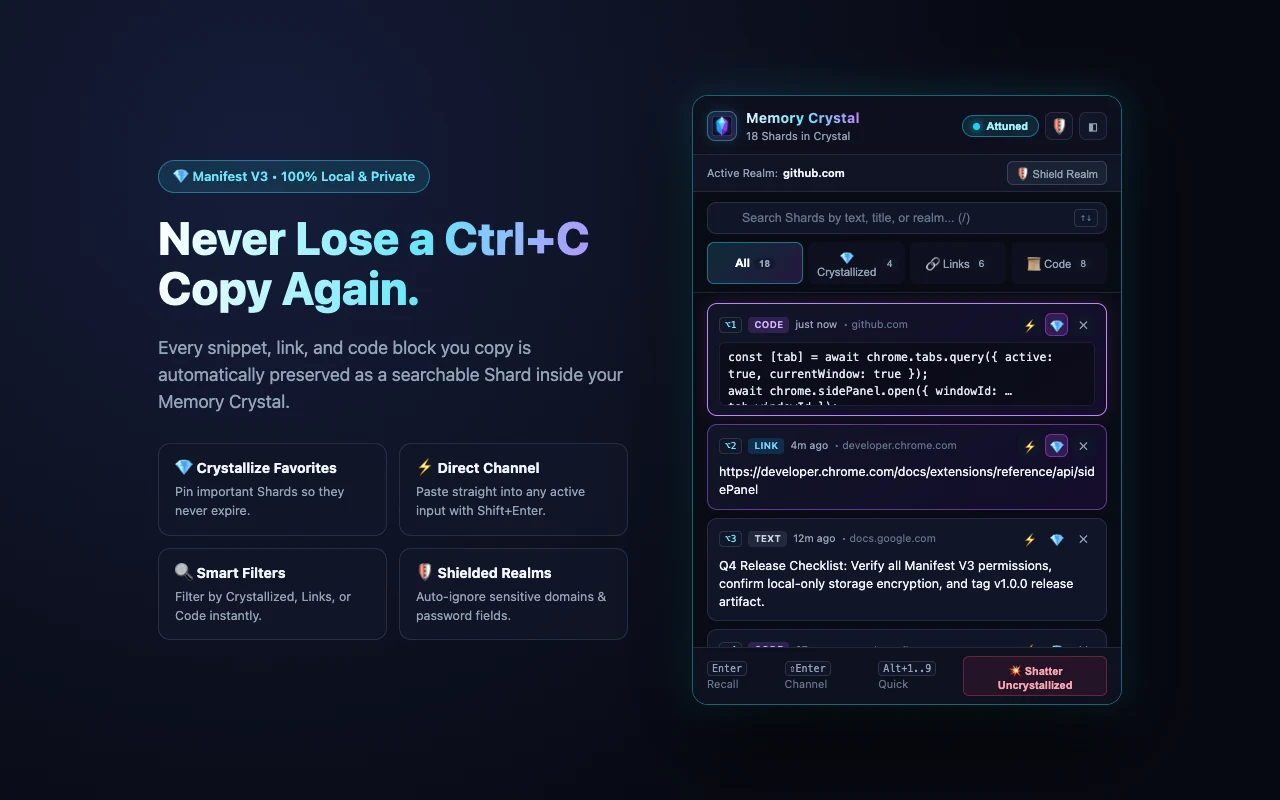
Preserve everything you press Ctrl+C or Cmd+C on as searchable local Shards across an obsidian-and-crystal Popup and Chrome Side Panel.
Memory Crystal is a zero-dependency Manifest V3 Chrome Extension designed so you never lose a copied code snippet, URL, or paragraph when copying something new. Every copy action is automatically captured, categorized (link, code, or text), and tagged with its origin domain.
Key capabilities include:
- Universal Copy Capture: Captures keyboard copies (
Ctrl+C/Cmd+C), right-click context copies, website "Copy" buttons (navigator.clipboard.writeText), and external OS clipboard entries on open. - Crystallize Favorites: Pin essential Shards so they remain permanently protected against the 100-item FIFO rolling eviction and bulk clear actions.
- Instant Search & Smart Filters: Filter your history in real time by All, Crystallized, Links, or Code snippets, or search across snippet text, page title, and source domain.
- One-Click Recall & Direct Channel: Click any Shard (or press
Enter/Alt+1..9) to copy it back to your clipboard, or pressShift+Enterto Channel (paste) it directly into the focused<input>,<textarea>, orcontenteditableeditor on the active tab. - Popup & Persistent Side Panel: Summon via
Ctrl+Shift+Y(Command+Shift+Yon macOS) for fast keyboard recall, or dock into Chrome's native Side Panel for side-by-side developer research. - Privacy Guardrails (Dormant Mode & Shielded Realms): Pause capture globally with one click, or add sensitive domains (password managers, banking portals) to your Shielded Realms blocklist.
Technical Architecture: Reverse-Engineering Memory Crystal
Capturing clipboard activity reliably across modern Single Page Applications (GitHub, ChatGPT, StackOverflow, documentation portals) within Chrome Manifest V3 requires coordinating three isolated execution contexts: a MAIN world page hook, an ISOLATED world content script, and an event-driven background Service Worker.
1. Dual-World Content Script Capture Pipeline (MAIN vs ISOLATED)
Standard DOM copy event listeners only fire when a user presses Ctrl+C or selects Copy from the browser menu. However, modern web apps implement custom "Copy code" buttons that call navigator.clipboard.writeText() directly in JavaScript-which never triggers a DOM copy event.
Because content scripts run in an ISOLATED JavaScript world, wrapping Clipboard.prototype.writeText inside a standard content script has no effect on the host page's window.navigator.clipboard. Memory Crystal solves this by registering two complementary scripts in manifest.json at document_start:
content/page-hook.js(world: "MAIN"): WrapsClipboard.prototype.writeTextviaObject.defineProperty+Reflect.applyand intercepts legacydocument.execCommand('copy')calls, bridging captured strings to the isolated world via a custom DOM event:
// content/page-hook.js - Runs in MAIN world at document_start
(() => {
  if (window.__memoryCrystalHookInstalled) return;
  window.__memoryCrystalHookInstalled = true;

  const EVENT_NAME = '__memory_crystal_captured__';

  function emitCapturedText(text) {
    if (typeof text !== 'string' || !text.trim()) return;
    window.dispatchEvent(new CustomEvent(EVENT_NAME, { detail: { text } }));
  }

  // 1. Intercept programmatic navigator.clipboard.writeText() calls
  if (typeof Clipboard !== 'undefined' && typeof Clipboard.prototype?.writeText === 'function') {
    const originalWriteText = Clipboard.prototype.writeText;
    Object.defineProperty(Clipboard.prototype, 'writeText', {
      configurable: true,
      writable: true,
      value: async function (data) {
        const result = await Reflect.apply(originalWriteText, this, [data]);
        if (typeof data === 'string') {
          emitCapturedText(data);
        }
        return result;
      }
    });
  }
})();
content/content.js(world: "ISOLATED"): Listens for both nativecopy/cutevents (in the capture phase, with aqueueMicrotaskfallback for bubble-phaseclipboardDatamutation) and the__memory_crystal_captured__custom event, while strictly ignoring<input type="password">elements and deduplicating 450ms echo bursts:
// content/content.js - Runs in ISOLATED world at document_start
function isPasswordInput(el) {
  return Boolean(el && el.tagName === 'INPUT' && String(el.type).toLowerCase() === 'password');
}

function extractCopiedText(clipboardEvent) {
  const active = document.activeElement;
  if (isPasswordInput(active)) return '';

  // 1. Active input/textarea selection slice
  if (
    active &&
    (active.tagName === 'TEXTAREA' || active.tagName === 'INPUT') &&
    typeof active.selectionStart === 'number' &&
    active.selectionStart !== active.selectionEnd
  ) {
    return active.value.slice(active.selectionStart, active.selectionEnd);
  }

  // 2. Standard DOM window selection
  const selectionText = window.getSelection()?.toString() || '';
  if (selectionText.trim()) return selectionText;

  // 3. Custom clipboardData payload populated by page scripts
  return clipboardEvent?.clipboardData?.getData('text/plain') || '';
}
2. Serialized Service Worker Storage Queue & Heuristic Classifier
In Manifest V3, background Service Workers are ephemeral and can be terminated after 30 seconds of inactivity, making in-memory global state unsafe. Furthermore, when a website button triggers both document.execCommand('copy') and a custom listener simultaneously, concurrent chrome.storage.local.get + set calls can cause a read-modify-write race condition.
service-worker.js serializes all storage mutations through a promise-chained mutex (enqueueMutation) and classifies each incoming snippet into link, code, or text:
// service-worker.js - Promise-chained storage mutex & heuristic classifier
let mutationTail = Promise.resolve();
function enqueueMutation(fn) {
  const next = mutationTail.then(fn, fn);
  mutationTail = next.then(() => undefined, () => undefined);
  return next;
}

function categorizeShard(text) {
  const trimmed = text.trim();

  // 1. Single-token HTTP/HTTPS URL
  if (!/\s/.test(trimmed) && /^https?:\/\/[^\s/$.?#].[^\s]*$/i.test(trimmed)) {
    return 'link';
  }

  // 2. Valid JSON object or array
  if (
    (trimmed.startsWith('{') && trimmed.endsWith('}')) ||
    (trimmed.startsWith('[') && trimmed.endsWith(']'))
  ) {
    try {
      JSON.parse(trimmed);
      return 'code';
    } catch { /* fall through to code signal scoring */ }
  }

  // 3. Multi-language syntax & CLI command scoring
  const codeSignals = [
    /\b(const|let|var|function|return|import|export|async|await|class|interface|type|def|elif|pub fn|impl)\b/,
    /=>|===|!==|\?\./,
    /<\/?[a-z][\s\S]*>/i,
    /^\s*(npm|pnpm|yarn|npx|git|docker|kubectl|curl|brew|pip|python3?|cargo|go)\s+/m,
    /\b(SELECT|INSERT\s+INTO|UPDATE|DELETE\s+FROM|CREATE\s+TABLE|WHERE|JOIN)\b/i,
    /[{};]\s*$/m
  ];

  let score = 0;
  for (const regex of codeSignals) {
    if (regex.test(trimmed)) score += 1;
  }
  if (trimmed.includes('\n') && /^\s{2,}\S/m.test(trimmed)) score += 1;

  return score >= 2 || (score >= 1 && /[{};()=>]/.test(trimmed)) ? 'code' : 'text';
}
Crystallized Eviction Protection
Each Shard is capped at 100 KB to protect chrome.storage.local quotas. When the history exceeds maxUncrystallized: 100, the eviction filter prunes only oldest uncrystallized items while preserving all pinned (shard.crystallized === true) Shards:
let uncrystallizedCount = 0;
const prunedShards = updatedShards.filter((shard) => {
  if (shard.crystallized) return true; // Permanently protected
  uncrystallizedCount += 1;
  return uncrystallizedCount <= maxUncrystallized;
});
3. Closed Shadow DOM Toasts & Direct Input Channeling
When inscribing a Shard via the right-click context menu or Channeling (Shift+Enter) a Shard directly into the active webpage input, content/content.js mounts an encapsulated notification inside a closed Shadow DOM (host.attachShadow({ mode: 'closed' })) so host page stylesheets never distort the UI.
For Direct Channeling, simply mutating input.value breaks controlled inputs in React, Vue, and Angular because framework state trackers overwrite the DOM value on the next render cycle. Memory Crystal splices the text at the active cursor range and dispatches bubbling input and change events:
function channelTextIntoActiveElement(text) {
  const active = document.activeElement;
  if (!active) return false;

  if (active.tagName === 'TEXTAREA' || active.tagName === 'INPUT') {
    const start = typeof active.selectionStart === 'number' ? active.selectionStart : active.value.length;
    const end = typeof active.selectionEnd === 'number' ? active.selectionEnd : active.value.length;
    active.value = active.value.slice(0, start) + text + active.value.slice(end);

    const newCursor = start + text.length;
    active.setSelectionRange?.(newCursor, newCursor);

    // Notify React/Vue/Angular state listeners
    active.dispatchEvent(new Event('input', { bubbles: true }));
    active.dispatchEvent(new Event('change', { bubbles: true }));
    showCrystalToast('⚡ Shard channeled into active field');
    return true;
  }

  if (active.isContentEditable) {
    active.focus();
    return document.execCommand('insertText', false, text);
  }
  return false;
}
4. Dual-Mode Popup & Persistent Side Panel Architecture
Memory Crystal serves both its toolbar Popup and Chrome Side Panel from a single HTML entry point (ui/crystal.html) differentiated by query string (?mode=popup vs ?mode=sidepanel):
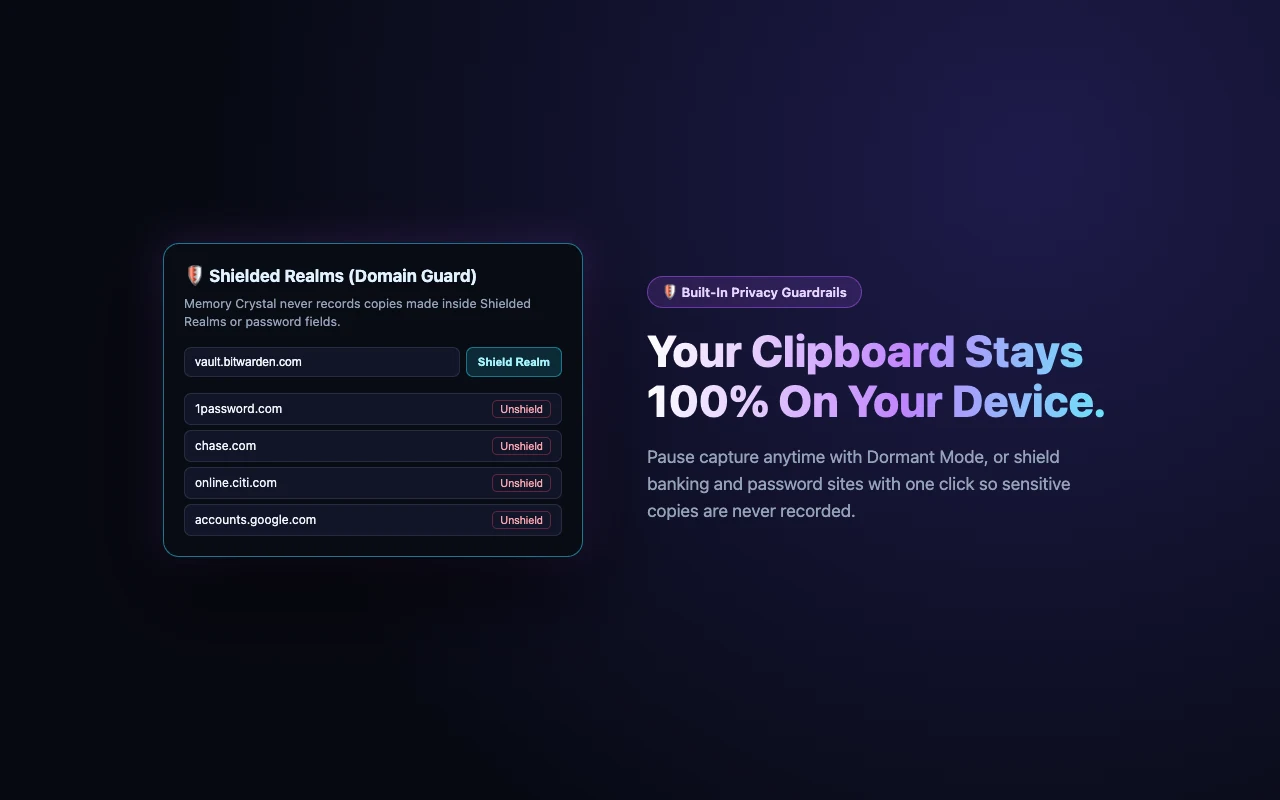
When docked in the Side Panel, ui/crystal.js subscribes to chrome.tabs.onActivated and chrome.tabs.onUpdated so the Active Realm Bar dynamically tracks the hostname of whichever tab you switch to, allowing one-click domain shielding (isDomainShielded) across subdomains:
function isDomainShielded(hostname, shieldedDomains = []) {
  const cleanHost = hostname.replace(/^www\./i, '').toLowerCase();
  return shieldedDomains.some((rawDomain) => {
    const d = String(rawDomain || '').trim().replace(/^www\./i, '').toLowerCase();
    return d && (cleanHost === d || cleanHost.endsWith(`.${d}`));
  });
}
Lore Dictionary & Keyboard Shortcuts Reference
| Action / Concept | Memory Crystal Term | Shortcut / Trigger | Technical Behavior |
|---|---|---|---|
| Summon UI | Summon Crystal | Ctrl+Shift+Y / Cmd+Shift+Y | Opens the Memory Crystal popup with the search bar focused. |
| Saved Snippet | Shard | Ctrl+C / Copy Button / Right-Click | Stored in chrome.storage.local with category, timestamp, and origin domain. |
| Pin Favorite | Crystallize | ClickCrystal Icon | Sets crystallized: true, exempting the Shard from FIFO eviction and bulk clear. |
| Copy to Clipboard | Recall | Enter / Click / Alt+1..9 | Writes Shard text to navigator.clipboard, increments recallCount, and bumps to #1. |
| Direct Paste | Channel | Shift+Enter / Lightning Icon | Injects Shard text directly at the cursor inside the active tab's focused input or editor. |
| Focus Search | Scry Shards | / | Immediately focuses and selects the search input from anywhere in the popup. |
| Delete / Clear | Shatter | Delete Icon / Shatter Uncrystallized | Removes a single Shard or purges all uncrystallized Shards at once. |
| Pause Capture | Attuned / Dormant | Header Status Pill | Toggles isDormant and displays a ZZZ toolbar badge while paused. |
| Domain Blocklist | Shielded Realms | Shield Icon | Blocks copy capture on matching domains and subdomains (*.example.com). |
Manifest V3 Permissions & Security Justification
| Permission | Scope | Technical Justification |
|---|---|---|
storage | Local Storage | Persists captured Shards and privacy settings (isDormant, shieldedDomains) in chrome.storage.local. |
sidePanel | Browser UI | Enables docking Memory Crystal into Chrome's persistent Side Panel via chrome.sidePanel.open(). |
contextMenus | Context Menu | Registers "Inscribe selection into Memory Crystal" and "Open Memory Crystal Side Panel". |
tabs | Active Tab Metadata | Reads the active tab's URL and title to attribute Shard origin and evaluate Shielded Realms. |
clipboardRead | System Clipboard Sync | Synchronizes external OS clipboard text when opening the popup or side panel. |
clipboardWrite | Clipboard Recall | Writes a selected Shard back to the system clipboard on Recall. |
Client-Side Security & Zero-Server Data Guarantee
Memory Crystal is engineered with strict local-first privacy guarantees:
- Zero External Network Calls: The extension makes zero
fetch(),XMLHttpRequest, or WebSocket connections. No telemetry, analytics, or clipboard payloads ever leave your browser. - Automatic Password Field Exclusion: Any copy or cut event originating from an
<input type="password">element is rejected at the content script boundary before reaching the Service Worker. - Shielded Realms & Dormant Mode: Sensitive domains (such as banking portals, cloud consoles, or web vaults) can be permanently excluded via Shielded Realms, or capture can be paused globally via Dormant mode.
Get notified about updates to this tool
No spam. Just high-quality updates about new features and guides.