Delphi: PlayStation Store Price Tracker & Wishlist
Prophetic insight that predicts seasonal sales cycles and all-time-low records across 50+ PlayStation Store regions.
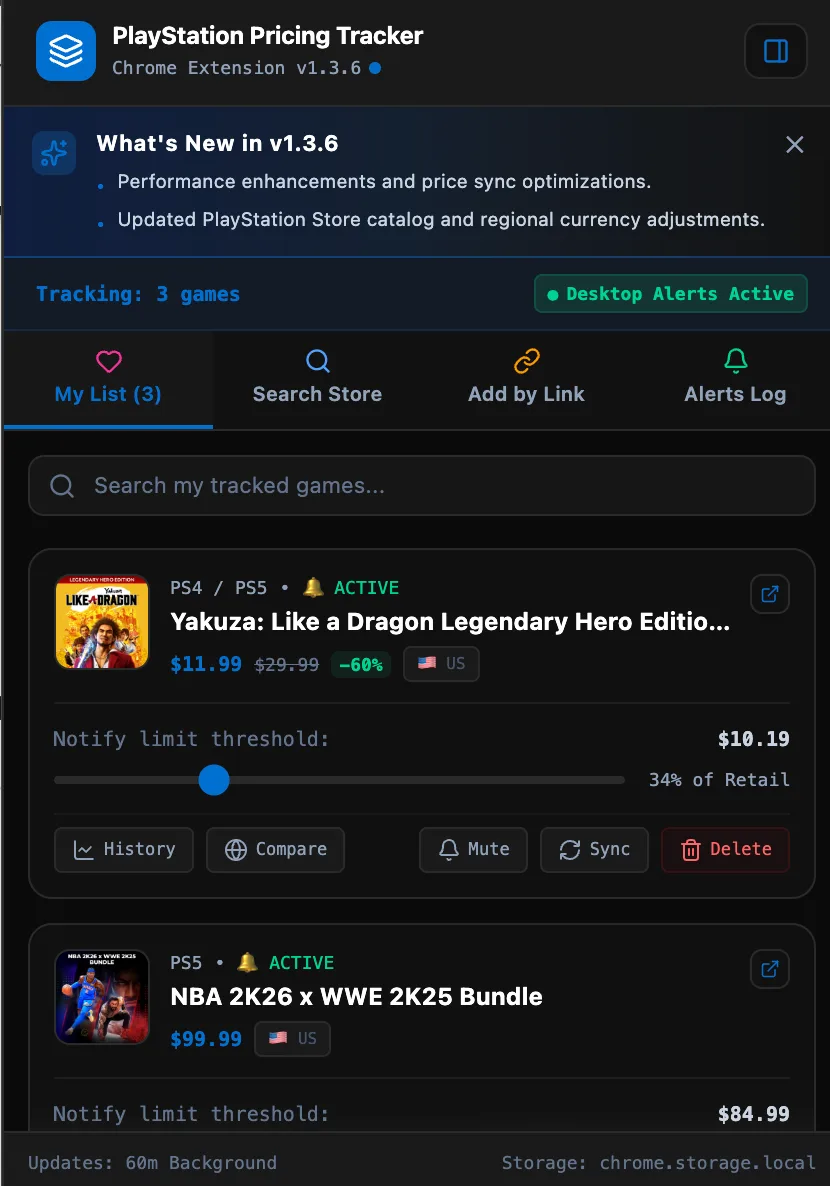
Named after the ancient Oracle of Delphi, Delphi is a Manifest V3 Google Chrome extension engineered to forecast price fluctuations, track seasonal discounts, and monitor PlayStation Store games globally. Instead of falling for synthetic markdown claims, Delphi gives gamers deep analytical clarity by comparing pricing across international storefronts, surfacing historical all-time lows, and notifying you the moment a game hits your target budget.
Key features include:
- PlayStation GraphQL Universal Search: Real-time catalog search powered by Sony's official GraphQL engine with automatic Roman and Arabic numeral normalization.
- Chrome Side Panel Companion: Keep your wishlist and live price charts docked alongside store pages without the popup closing as you browse.
- Multi-Region Price Matrix: Compare live prices across 50+ international regions with automated currency conversion into a unified USD base.
- In-Page Shadow DOM Tracker: Mounts an isolated price alert widget directly onto official PlayStation Store product pages without CSS leakage.
- Autonomous Price Drop Alarms: Background service workers periodically poll price feeds, updating toolbar badges and firing desktop alerts.
- Historical SVG Price Graphs: Visualize price trends, historical lows, and discount frequencies directly inside the extension popup and side panel.
- Zero Tracking Guarantee: Clean outbound store URLs with zero affiliate redirect tags or tracking scripts.
Technical Architecture: Reverse-Engineering Delphi
Building a reliable price monitoring client on top of the PlayStation Store Single Page Application (SPA) presents unique challenges: heavy client-side hydration, dynamic route mutation, regional currency formatting variations, and service worker execution boundaries in Manifest V3.
Below is how Delphi coordinates catalog queries, content scripts, background workers, and persistent storage.
[ User Interaction / chrome.alarms (60 min) ]
                     │
       ┌─────────────┴─────────────┐
       ▼                           ▼
[ Official GraphQL Search ]   [ Service Worker Scraper (scrapePSPrice) ]
  ├── SHA-256 Persisted Query   ├── Tier 1: Non-Subscription Retail Offer Object
  ├── Roman/Arabic Conversion   ├── Tier 2: __NEXT_DATA__ Apollo Cache
  └── Multi-Region Locale Feed  └── Tier 3: Schema.org JSON-LD Structured Data
                     │
                     ▼
[ Currency Normalization Engine (data.ts) ]
  ├── 50+ Regional Exchange Rates
  ├── Native USD Store Handler (LATAM / Middle East)
  └── Evaluates Target Thresholds (isTargetPriceMet)
                     │
       ┌─────────────┴─────────────┐
       ▼                           ▼
[ Dynamic Action Badge ]     [ Chrome Desktop Notification ]
  └── Green Badge (#10b981)    └── chrome.notifications.create
1. Official PlayStation Store GraphQL Universal Search Engine
Delphi queries PlayStation Store's official universal search GraphQL endpoint (web.np.playstation.com/api/graphql/v1/op?operationName=getSearchResults) rather than parsing search HTML. Queries are executed with Sony's persisted SHA-256 operation hash:
const GQL_SEARCH_HASH = '4df6284f982e57bec70f23c77e2c219dc792eb19af7fb3d3a81767aa3f1958aa';

async function fetchGraphQLSearch(searchTerm: string, region: RegionConfig, pageSize = 12) {
  const locale = region.locale ? region.locale.toLowerCase() : 'en-us';
  const variables = JSON.stringify({
    searchTerm,
    pageSize,
    pageOffset: 0,
    countryCode: (region.key || 'US').toUpperCase(),
    languageCode: locale.split('-')[0] || 'en',
  });

  const extensions = JSON.stringify({
    persistedQuery: {
      version: 1,
      sha256Hash: GQL_SEARCH_HASH,
    },
  });

  const url = `https://web.np.playstation.com/api/graphql/v1/op?operationName=getSearchResults&variables=${encodeURIComponent(variables)}&extensions=${encodeURIComponent(extensions)}`;

  const res = await fetch(url, {
    headers: {
      'X-PSN-Store-Locale-Override': locale,
      'Content-Type': 'application/json',
      'x-apollo-operation-name': 'getSearchResults',
      Accept: 'application/json',
    },
  });

  if (!res.ok) return null;
  const json = await res.json();
  return json?.data?.universalSearch?.results || null;
}
To bridge the gap between user search queries and Sony's strict catalog indexing, Delphi implements a bidirectional Roman and Arabic numeral transformer (convertNumerals):
const ARABIC_TO_ROMAN: Record<string, string> = {
  '1': 'i', '2': 'ii', '3': 'iii', '4': 'iv', '5': 'v',
  '6': 'vi', '7': 'vii', '8': 'viii', '9': 'ix', '10': 'x',
  '11': 'xi', '12': 'xii', '13': 'xiii', '14': 'xiv', '15': 'xv', '16': 'xvi',
};

const ROMAN_TO_ARABIC: Record<string, string> = Object.fromEntries(
  Object.entries(ARABIC_TO_ROMAN).map(([k, v]) => [v, k])
);

function convertNumerals(query: string): string | null {
  const words = query.trim().split(/\s+/);
  let transformed = false;
  const converted = words.map((w) => {
    const lower = w.toLowerCase();
    if (ARABIC_TO_ROMAN[lower]) {
      transformed = true;
      return ARABIC_TO_ROMAN[lower];
    }
    if (ROMAN_TO_ARABIC[lower]) {
      transformed = true;
      return ROMAN_TO_ARABIC[lower];
    }
    return w;
  });
  return transformed ? converted.join(' ') : null;
}
If a title such as "Final Fantasy 7" returns no matches, Delphi transparently retries with "Final Fantasy VII", followed by an automatic fallback to Sony's internal Chihiro & Tumbler search API.
2. Headless Service Worker Price Scraping
In Chrome Manifest V3, background tasks execute in headless Service Workers where window, document, and DOMParser do not exist. To scrape prices periodically in the background, Delphi uses a raw-text extraction pipeline.
Sony embeds retail prices in multiple internal JSON payloads. Delphi inspects the raw HTML response against three extraction tiers:
async function scrapePSPrice(url) {
  const controller = new AbortController();
  const timer = setTimeout(() => controller.abort(), 10000);

  try {
    const res = await fetch(url, {
      signal: controller.signal,
      headers: {
        'User-Agent': 'Mozilla/5.0 (Windows NT 10.0; Win64; x64) AppleWebKit/537.36 (KHTML, like Gecko) Chrome/128.0.0.0 Safari/537.36',
        'Accept-Language': 'en-US,en;q=0.9',
        Accept: 'text/html,application/xhtml+xml,application/xml;q=0.9,*/*;q=0.8',
      },
    });
    clearTimeout(timer);
    if (!res.ok) return null;
    const html = await res.text();

    // Strategy 1: Non-Subscription Retail Offer Object (in cents)
    const nonSubMatches = html.match(
      /\{[^{}]*"originalPriceValue"[^{}]*"offerIsTiedToSubscription"\s*:\s*false[^{}]*\}/g
    );
    if (nonSubMatches) {
      for (const raw of nonSubMatches) {
        try {
          const obj = JSON.parse(raw);
          if (typeof obj.discountPriceValue === 'number' && typeof obj.originalPriceValue === 'number') {
            const price = obj.discountPriceValue / 100;
            const originalPrice = obj.originalPriceValue / 100;
            if (originalPrice > 0) return { price, originalPrice: Math.max(price, originalPrice) };
          }
        } catch { /* proceed to next match */ }
      }
    }

    // Strategy 2: Next.js Apollo Cache (__NEXT_DATA__)
    const nextDataMatch = html.match(/<script\s+id=["']__NEXT_DATA__["'][^>]*>([\s\S]*?)<\/script>/i);
    if (nextDataMatch?.[1]) {
      const data = JSON.parse(nextDataMatch[1].trim());
      const apolloState = data?.props?.pageProps?.batarangs?.initialState?.apolloState || {};
      for (const key of Object.keys(apolloState)) {
        if (key.startsWith('Product:')) {
          const prod = apolloState[key];
          const rawDiscounted = (prod?.price?.discountedPrice || prod?.price?.basePrice || '').replace(/[^0-9.]/g, '');
          const price = parseFloat(rawDiscounted);
          if (!isNaN(price) && price > 0) return { price, originalPrice: price };
        }
      }
    }

    // Strategy 3: Schema.org JSON-LD Structured Data
    const jsonLdRegex = /<script\s+[^>]*type=["']application\/ld\+json["'][^>]*>([\s\S]*?)<\/script>/gi;
    let ldMatch;
    while ((ldMatch = jsonLdRegex.exec(html)) !== null) {
      try {
        const json = JSON.parse(ldMatch[1].trim());
        const entries = Array.isArray(json) ? json : [json];
        for (const entry of entries) {
          const offer = Array.isArray(entry.offers) ? entry.offers[0] : entry.offers;
          if (offer && offer.price !== undefined) {
            const parsed = parseFloat(offer.price);
            if (!isNaN(parsed)) return { price: parsed, originalPrice: parsed };
          }
        }
      } catch { /* continue */ }
    }

    return null;
  } catch (err) {
    clearTimeout(timer);
    return null;
  }
}
3. Chrome Side Panel Companion and Shadow DOM In-Page Module
Delphi enables Chrome's Manifest V3 sidePanel API, allowing you to keep the full interface open alongside store pages without losing focus when interacting with the main browser viewport:
{
  "permissions": ["sidePanel", "storage", "alarms", "notifications"],
  "side_panel": {
    "default_path": "popup.html"
  }
}
On official store pages (https://store.playstation.com/*), the content script mounts an isolated Shadow DOM container directly underneath the purchase CTA ([data-qa="mfe-cta-container"]):
function injectTrackerModule() {
  if (document.getElementById('ps-price-tracker-shadow-host')) return;

  const targetContainer = document.querySelector(
    '[data-qa="mfe-cta-container"], .psw-grid, .mfe-game-title'
  );
  if (!targetContainer) return;

  const gameData = extractGameData();
  if (!gameData || !gameData.title) return;

  const host = document.createElement('div');
  host.id = 'ps-price-tracker-shadow-host';
  host.style.display = 'block';
  host.style.margin = '16px 0';

  const shadow = host.attachShadow({ mode: 'open' });
  const style = document.createElement('style');
  style.textContent = `
    :host {
      display: block;
      font-family: -apple-system, BlinkMacSystemFont, "Segoe UI", Roboto, sans-serif;
      box-sizing: border-box;
    }
    .card {
      background: #111827;
      border: 1px solid #1f2937;
      border-radius: 12px;
      padding: 14px 16px;
      color: #f3f4f6;
      box-shadow: 0 4px 16px rgba(0, 0, 0, 0.4);
    }
  `;
  shadow.appendChild(style);
  shadow.appendChild(buildTrackerCard(gameData));
  targetContainer.appendChild(host);
}
Because Sony utilizes client-side routing, route changes are tracked with a debounced MutationObserver listening for /product/ and /concept/ path transitions.
4. Cross-Region Price Normalization and USD Base Engine
Comparing prices across global PlayStation Stores involves fluctuating exchange rates and localized currency notations. Some regional storefronts (including Argentina, Chile, Colombia, Peru, and Kuwait) display prices denominated in US Dollars rather than local currencies.
Delphi detects USD-denominated pricing within foreign regions and normalizes all stored values to a unified USD base currency:
const samplePriceText = `${basePriceStr} ${discountedPriceStr}`;
const isAlreadyUSD =
  samplePriceText.includes('US$') ||
  (samplePriceText.includes('$') && !reg.symbol.includes('$'));

const effectiveRate = isAlreadyUSD ? 1.0 : reg.rate > 0 ? reg.rate : 1.0;

const priceUSD = localPrice / effectiveRate;
const originalPriceUSD = originalLocalPrice / effectiveRate;

function isTargetPriceMet(item: WishlistItem, game: Game): boolean {
  const rate = getRegionRate(game.url, item.regionKey || game.nativeRegionKey);
  const targetPriceUSD = rate > 0 ? item.targetPrice / rate : item.targetPrice;
  return game.currentPrice <= targetPriceUSD;
}
5. Autonomous Background Alarms and Dynamic Toolbar Badge
Price checking runs periodically in the background via the chrome.alarms API without requiring an active browser tab or open popup:
const ALARM_NAME = 'ps_price_check';
const CHECK_INTERVAL_MINUTES = 60;

chrome.runtime.onInstalled.addListener(async () => {
  const existing = await chrome.alarms.get(ALARM_NAME);
  if (!existing) {
    await chrome.alarms.create(ALARM_NAME, { periodInMinutes: CHECK_INTERVAL_MINUTES });
  }
});

chrome.alarms.onAlarm.addListener((alarm) => {
  if (alarm.name === ALARM_NAME) {
    checkForPriceDrops();
  }
});
When a tracked game reaches or drops below your target price threshold, the service worker increments the toolbar badge count, highlights it in emerald green (#10b981), and fires a native Chrome desktop notification:
async function updateActionBadge(wishlist, games) {
  let dropCount = 0;
  for (const item of wishlist) {
    if (!item.isTrackingActive) continue;
    const game = games.find((g) => g.id === item.gameId);
    if (game && isPriceBelowTarget(item, game)) {
      dropCount++;
    }
  }

  if (dropCount > 0) {
    await chrome.action.setBadgeText({ text: String(dropCount) });
    await chrome.action.setBadgeBackgroundColor({ color: '#10b981' });
  } else {
    await chrome.action.setBadgeText({ text: '' });
  }
}
Capabilities & Feature Reference
| Capability | Module / Layer | Technical Behavior |
|---|---|---|
| Universal Catalog Search | GraphQL API (UniversalSearch) | Live search against Sony's production catalog with automated Roman/Arabic numeral conversions and Chihiro API fallback. |
| Side Panel Companion | chrome.sidePanel | Keeps the wishlist, price chart, and regional comparisons docked beside store pages without auto-closing on click. |
| In-Page Tracker Module | Content Script (Shadow DOM) | Injects an isolated quick-track widget beneath [data-qa="mfe-cta-container"] with debounced route observation. |
| Multi-Region Matrix | Regional Engine (data.ts) | Converts 50+ international currencies to USD base values, with automatic overrides for USD-native foreign regions. |
| Price Drop Alarms | chrome.alarms & Service Worker | Polls active wishlist items every 60 minutes, evaluates target thresholds, and triggers native desktop alerts. |
| Dynamic Action Badge | chrome.action | Displays an emerald badge counter (#10b981) indicating the number of wishlisted games currently at or below target price. |
| Interactive Price Graph | SVG Chart Component | Renders historical price drops and all-time-low tracking directly in popup and side panel interfaces. |
Manifest V3 Permissions & Security Justification
| Permission | Scope | Technical Justification |
|---|---|---|
storage | Local Storage | Persists tracked games, regional currency preferences, target price thresholds, and price history in chrome.storage.local. |
alarms | Background Scheduler | Wakes the service worker periodically to check for price drops without requiring open tabs. |
notifications | Desktop Alerts | Dispatches system desktop notifications when a tracked game drops below the user's defined target price. |
sidePanel | Chromium Side Panel | Allows the extension UI to be docked alongside PlayStation Store pages for uninterrupted browsing. |
tabs | Active Browser Tab | Verifies whether the active tab is an official PlayStation Store product page to enable one-click tracking. |
https://*.playstation.com/* | Store Host | Fetches public price information and queries the official GraphQL search endpoint (web.np.playstation.com). |
Client-Side Security & Zero-Server Data Guarantee
Delphi operates strictly within the local browser sandbox:
- Zero External Egress: All API requests connect exclusively to official Sony PlayStation endpoints (
store.playstation.comandweb.np.playstation.com). No intermediate proxy, telemetry service, or analytics server is used. - Zero Affiliate Tagging: Store links point directly to official PlayStation Store URLs. No affiliate marketing tags or third-party query parameters are injected.
- Local-Only Data Persistence: Wishlists, regional selections, and price alerts are stored entirely in
chrome.storage.localon your machine and are never synchronized to external servers. - Instant Data Erasure: Removing a game from your wishlist permanently deletes its history from local storage. Uninstalling the extension immediately wipes all local configuration.
Get notified about updates to this tool
No spam. Just high-quality updates about new features and guides.
Related Tools
Related Posts

Learn how to detect Google AdSense on any website using Python. Covers fast HTML scanning with BeautifulSoup, ads.txt validation, and headless Playwright automation to bypass bot protection and lazy loading.

Learn how to easily download YouTube video thumbnails using Python's requests library, without the need for heavy dependencies like Pytube. This guide covers extracting video IDs from various YouTube URL formats and fetching the highest quality thumbnail available.
This piece will introduce Make (formerly Integromat) as a direct competitor to n8n, highlighting its visual, diagram-like workflow builder. The comparison will focus on key differences in pricing models, UI/UX, and advanced features like branching logic, which are a major selling point for Make. Examples will show how to build the same complex workflow in both n8n and Make to illustrate their unique approaches.