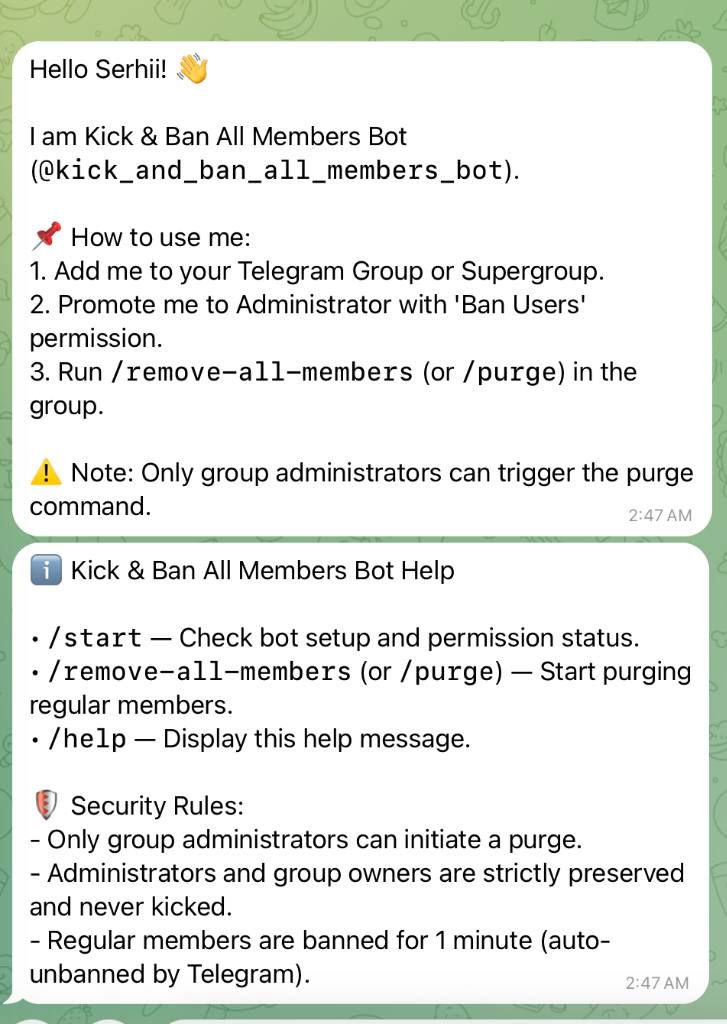
Kick_and_ban_all_members_bot
@kick_and_ban_all_members_bot is a specialized Telegram group moderation tool engineered for bulk member purges.
Architecture Overview
I designed @kick_and_ban_all_members_bot using a hybrid architecture that combines standard HTTP Webhook bot dispatching with an asynchronous MTProto worker client.
+------------------+           +--------------------------+           +------------------------+
| Telegram Webhook | --------> | Command Handler Layer    | --------> | ThreadPoolExecutor     |
| (Bot API)        |           | (handlers.py)            |           | (Background Worker)    |
+------------------+           +--------------------------+           +------------------------+
                                            |                                      |
                                  [Admin Auth & Perms]                             v
                                                                      +------------------------+
                                                                      | Pyrogram MTProto Client|
                                                                      | (Async Member Stream)  |
                                                                      +------------------------+
                                                                                   |
                                                                                   v
                                                                      [1-Min Auto-Unban & FW]
Key Components
- Command Handler Layer (
python-telegram-bot): Handles incoming/start,/help, and/remove_all_members(or/purge) commands, verifies user administrator status, and checks bot privileges (can_restrict_members). - Background Executor (
ThreadPoolExecutor): Spawns isolated event loops to prevent long-running member iteration from blocking the primary webhook server thread. - Async MTProto Worker (
Pyrogram): Streams large chat member lists asynchronously and dispatches ban requests while handling rate limits gracefully.
High-Throughput Purge Pipeline
Standard Bot API HTTP endpoints suffer from latency when fetching member lists for large supergroups. To bypass this limitation, I integrated Pyrogram to stream member objects over MTProto directly into an asynchronous worker.
async def purge_group_members_async(chat_id: int, status_message_id: int):
    app = Client(
        session_name=f"kick_bot_session_{abs(chat_id)}",
        api_id=int(settings.TELEGRAM_API_ID),
        api_hash=str(settings.TELEGRAM_API_HASH),
        bot_token=str(settings.KICK_AND_BAN_BOT_TOKEN),
        in_memory=True,
    )

    kicked_count = 0
    skipped_admins = 0

    async with app:
        async for member in app.get_chat_members(chat_id):
            user = member.user
            if not user:
                continue

            # Immunity Safeguard: Skip admins, owners, and bots
            if member.status in [ChatMembersFilter.ADMINISTRATORS, ChatMembersFilter.OWNER] or user.is_bot:
                skipped_admins += 1
                continue

            # 1-minute temporary ban (soft kick)
            until_date = int(time.time() + 60)
            await app.ban_chat_member(chat_id, user.id, until_date=until_date)
            kicked_count += 1
Resilience and Security Mechanisms
1. Temporary Ban Auto-Unban Mechanism
Instead of permanently banning users, the worker sets until_date = int(time.time() + 60). Telegram interprets short-duration bans as temporary restrictions. After 60 seconds expire, Telegram automatically lifts the restriction, allowing purged members to rejoin via an invite link if desired.
2. FloodWait Rate Limit Handling
Mass moderation actions trigger Telegram API rate limits (FloodWait). I implemented an automatic retry loop that intercepts FloodWait exceptions, updates the progress status message in the chat with the sleep duration, and pauses execution until Telegram accepts new requests:
banned = False
while not banned:
    try:
        until_date = int(time.time() + 60)
        await app.ban_chat_member(chat_id, user.id, until_date=until_date)
        kicked_count += 1
        banned = True
    except FloodWait as fw:
        logger.warning(f"FloodWait encountered: sleeping for {fw.value} seconds...")
        await app.edit_message_text(
            chat_id=chat_id,
            message_id=status_message_id,
            text=f"⏳ **Rate Limited by Telegram**\nPausing for {fw.value}s before resuming..."
        )
        await asyncio.sleep(fw.value)
3. Administrator Privilege Safeguards
To prevent unauthorized abuse or accidental lockouts:
- Sender Validation:
is_user_admin()verifies that only group creators or administrators can invoke/remove_all_membersor/purge. - Immunity Preserves: Group owners, co-admins, and system bots are explicitly skipped during member streaming.
Bot Setup and Commands
- Add
@kick_and_ban_all_members_botto your Telegram Group or Supergroup. - Promote the bot to Administrator with Ban Users permission.
- Use
/startto verify setup and/remove_all_members(or/purge) to initiate purging.
Command Reference
/start- Check bot setup and permission status in the chat./remove_all_members(or/purge) - Trigger member purge (Admins only)./help- Display usage instructions and security rules.
Interface Showcase